


DistroKid
4.7994.00 Reviews
App Specs
- Version
- 3.8.3
- Updated On
- License
- Free
- Downloads
- 1,000,000+
- Developer
- DistroKid
- Categories
- Music & Audio
- Platform
- Android
Screenshots
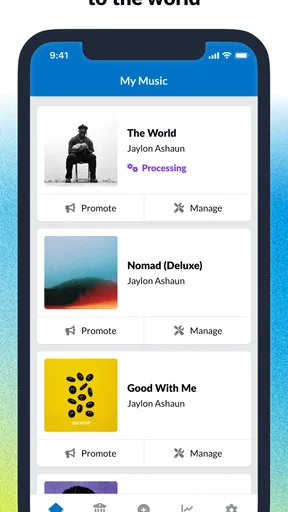
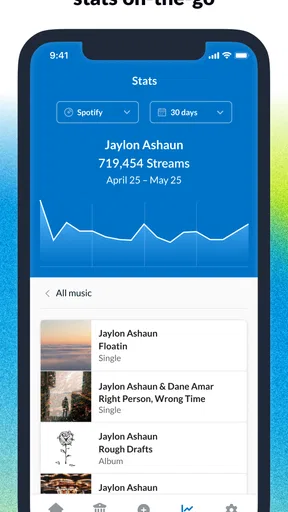
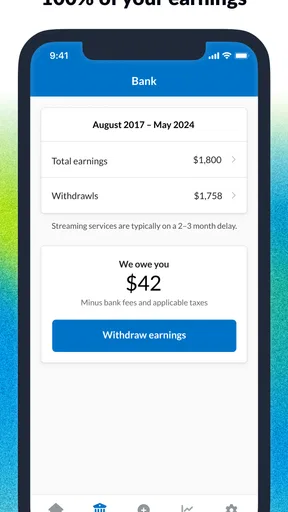
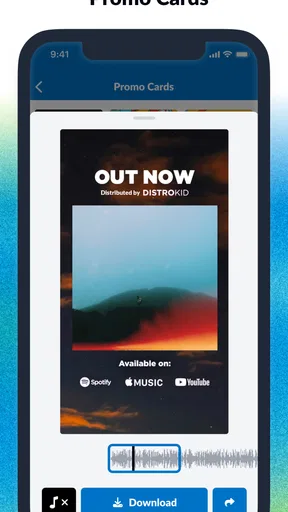
 Analysis by AppCompare
During the first week, the appeal of DistroKid is easy to understand: it puts music distribution tasks on a phone, where they can feel less like paperwork and more like a manageable part of releasing a track. I’d find that especially useful after finishing a song late at night, when I want to check the next steps without opening a laptop. The app is free to install, but its memberships and in-app purchases mean it is not simply a free distribution service; I’d check the current plan details before committing.
What feels useful in the first week
The first-week benefit is less about making music and more about reducing the distance between a finished recording and the release process. For an independent artist handling their own schedule, an app can make it easier to keep release tasks moving between rehearsals, work, and recording sessions. DistroKid is a music and audio app from DistroKid, and its focus is specifically on helping musicians distribute their work rather than serving as a general-purpose music player or recording studio.
That focus matters when comparing it with the usual alternatives. A streaming app helps listeners find and play music; a distributor helps artists deliver their releases to listening services. If I only want to listen to music, this is the wrong tool. If I’m deciding between a distributor and managing each platform separately, a distributor’s central workflow is the more practical starting point, though I’d still review where the music is going and what information each release requires before submitting it.
A realistic use case is an artist who has finished a single with a collaborator and wants to handle release administration during a short break. Rather than treating every step as a separate project, I’d use that moment to check the release details, confirm the collaborators’ information, and make sure the submitted version is the intended master. That last check is a small habit with real value: fixing an avoidable metadata or audio mistake after submission can be more annoying than slowing down briefly beforehand.
Getting Started with DistroKid
First off, let me tell you about the setup. Starting with DistroKid is a breeze. You just sign up, choose your plan, and you’re good to go. They have different membership tiers, so whether you're just starting out or you’re already a pro, there’s something for everyone. Plus, who doesn’t love options?
There is one decision I wouldn’t rush: choosing a plan based on an imagined future career rather than the releases I actually expect to make. The right fit depends on how often I plan to distribute music and which account needs I have, so I’d compare the current plan terms with my real release routine before paying. An artist releasing occasionally may value a different setup from someone who regularly puts out singles, collaborations, and longer projects.
The app has a 4.8 average from around 17,000 ratings, and it has passed 500,000 installs. Those figures suggest that many musicians have tried it, but they don’t tell me whether a particular plan suits my situation. The app is rated for Everyone, runs on Android 8.0 or later, and version 3.6.1 is the current version. I’d still make sure my device and operating system are compatible before planning a release around it.
Worth Reading Before You Choose

Flipboard Shows What News Apps Must Do Beyond the Feed

Switching to Android Auto Means Rethinking Your Driving Routine

Google Calendar Makes a Crowded Week Easier to Manage

Ludo King Makes the Most of the Minutes Between Plans

Baby Panda World Brings Quick Play to Modern Phones, but Its Game Library Feels Busy

ESPN’s Live Game View Makes Following Close Games Easier
Making the Release Routine Work
I use the release routine as the real test of whether a distributor belongs in my toolkit: can I prepare the next track without rushing, keep collaborators aligned, and return to the process when another release is ready? A small checklist for audio, credits, and agreed splits makes each submission easier to review and helps the app serve a steady habit rather than a burst of first-week enthusiasm.
Features That Make Life Easier
Now, let’s chat about the features. One of the coolest things is the unlimited uploads. Seriously, you can upload as many tracks as you want without paying extra. It’s like the Netflix of music distribution. And speaking of distribution, DistroKid sends your music to all the big players: Spotify, Apple Music, Amazon, you name it. This means your tunes are getting the exposure they deserve, without you lifting a finger.
For me, unlimited uploads are most useful when they change how I plan, not when they tempt me to release every rough idea. If I’m testing a sequence of singles or releasing a collaborative project, the ability to submit multiple tracks under a membership can make the workflow easier to budget for. But distribution itself is not promotion: sending a release to listening services does not guarantee listeners, playlist placement, or a sustainable audience. I’d treat it as delivery infrastructure and plan outreach separately.
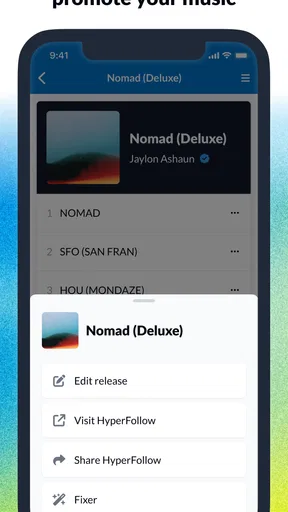
Another standout feature is the HyperFollow page. Once your music is live, you get a custom page where fans can pre-save your songs, follow you, and share your music. It’s a great way to build your fanbase and keep everyone in the loop about your latest tracks.
A practical way to use a release page is to make it the single destination in an announcement, rather than asking fans to search for the track on several services. I’d share it when a release is upcoming and again when it is available, while keeping the surrounding message personal. The page can reduce friction for someone who wants to follow or save a release, but it cannot replace having a reason for people to care about the music.
Oh, and let’s not forget about the instant Spotify verification. This is a big deal, especially if you’re looking to boost your credibility. Getting that little blue checkmark next to your name is like winning a mini Grammy for us indie artists!
That kind of status can be satisfying, but I wouldn’t make it the measure of whether a release is succeeding. A checkmark is not the same as stronger songs, a clear artist identity, or genuine listener relationships. If I were new to releasing music, I’d spend more energy checking the artist profile details and making sure the release points to the right identity than treating verification as a career milestone by itself.
Seamless User Experience
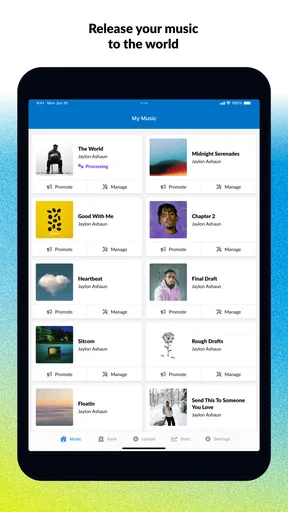
Using the app is as smooth as a well-produced track. The UI is intuitive, making navigation a total breeze. Whether you’re uploading new songs or checking your stats, everything is just a tap away. I mean, who wants to deal with a clunky app when you’re already stressing over your next gig, right?
Even with a straightforward interface, I’d avoid treating a phone screen as the ideal place for every release decision. Small details deserve a deliberate review, especially the track version, title, artist credits, and collaborator information. My useful habit would be to prepare those details in one place before starting an upload, then use the app to enter and verify them rather than trying to reconstruct everything from memory while multitasking.
And, let me highlight their customer support. If you ever find yourself in a jam (pun intended), their support team is super responsive. They’re like the trusty roadies of the app world, always ready to help you out.
For a less stressful support experience, I’d describe the issue precisely and include the release or account details needed to identify it, while avoiding sending sensitive information unnecessarily. Support is helpful when a process gets confusing, but it is not a substitute for keeping my own release notes. A simple record of what I submitted and when gives me something concrete to refer to if I need to follow up.
Royalty Splits and Revenue
Let’s talk money, because, let’s be real, making a living from your music is the dream. DistroKid allows you to split royalties automatically. So if you’re collaborating with other artists, everyone gets their fair share without any math headaches. Plus, they offer some pretty detailed stats, which are perfect for tracking your earnings and understanding your audience.
For a collaboration, I’d agree on the split with everyone before setting it up, and I’d keep that agreement in writing outside the app. Automatic handling can take routine calculations off the table, but it cannot resolve a disagreement about who owns what or what each person agreed to. This is one of the app’s more useful workflow advantages when the collaborators already have a clear understanding; it is not a replacement for that conversation.
The best part? You keep 100% of your earnings. That’s right, no hidden fees or sneaky deductions. Just pure, unadulterated cash in your pocket.
I’d read that claim alongside the plan cost and any applicable terms, rather than confusing keeping the full share of earnings with having no expenses at all. A paid membership is still part of the decision, and in-app purchases range from $24.99 to $269.99 per item. Since the amounts vary, I’d check the purchase details carefully and decide whether the service’s recurring value matches the number of releases I expect to manage.
What keeps it useful month after month
The ongoing value depends on whether I have a release habit that needs support. An artist who regularly shares singles, collaborations, or projects may return to the app for new submissions, royalty administration, and release-related checks. Someone who uploads one track and then takes a long break may find that the app has less day-to-day purpose; in that case, paying for a plan deserves closer thought than it would for a musician with a steady release schedule.
I’d also use the quieter weeks between releases to keep my workflow tidy. I can settle collaborator splits early, prepare accurate credits, and make sure I know which master is final before the next submission. These small preparations are not glamorous, but they help prevent rushed decisions when a release date is approaching. The app is most valuable when it supports a repeatable process rather than becoming a place I visit only after something has gone wrong.
Stats can help me notice which releases are attracting attention, but I’d resist checking them constantly or reading too much into a short-term change. The useful question is what action the information suggests: whether to share a release again, plan another track, or adjust how I speak to listeners. If the numbers do not lead to a sensible next step, refreshing them more often is unlikely to make the music career healthier.
Maintenance, limits, and release fatigue
The main maintenance burden is not keeping the app running; it is keeping the release process accurate and consistent. Each new track asks me to pay attention to the material and details I submit. Artists who enjoy releasing often may see that as normal admin. Artists who find metadata, credits, and release planning draining should be realistic about that work, because a distributor can organize delivery without removing the responsibility of preparing a release well.
There is also a fatigue risk in interpreting “unlimited” as “more is always better.” A high volume of releases can make it harder for me to give each song a thoughtful introduction and follow-through. I’d rather use the flexibility to release at a pace I can support than upload simply because there is no per-track charge. A release still needs time for listeners to discover it, and the distributor cannot decide that schedule for me.
For artists comparing services, the choice should come down to the actual workflow and terms, not a vague promise of reach. DistroKid may suit someone who wants a recurring distribution setup and expects to release repeatedly. A musician who needs only a one-off release, prefers a different payment structure, or wants hands-on promotional help may be better served by comparing other distributors or handling the release through a service that matches those priorities. I would compare renewal expectations, included tools, and any extra charges before switching or signing up.
Another sensible question is whether the phone app alone is enough for a particular release. For quick checks and routine tasks, mobile access can be convenient; for careful preparation, I’d still gather the audio, credits, and release plan before I begin. That is not a knock on the app. It is simply the difference between a convenient control point and the creative and administrative work that has to happen around it.
Final Thoughts
All in all, DistroKid is a game-changer for musicians looking to get their music out there without all the hassle. It’s affordable, easy to use, and packed with features that help you focus on what you do best—making music. If you’re serious about your music career, I’d say give it a shot. You might just find it’s the key to unlocking your full potential.
My recommendation is strongest for independent musicians who already expect to release regularly and want a central place to manage distribution-related tasks. I’d be more cautious if I were only curious about uploading one song, unsure about ongoing costs, or expecting the app to generate an audience on its own. A clear release plan and a realistic view of membership expenses make the difference between a useful tool and another subscription I forget to make good use of.
So, what are you waiting for? Get your music heard worldwide with DistroKid and start making some noise!
Pros
- Easy to upload music to multiple platforms.
- Affordable pricing with unlimited uploads.
- Fast distribution and updates.
- Keeps 100% of your royalties.
- User-friendly interface for beginners.
Cons
- Limited customer support options.
- No free tier available for users.
- Some features require an extra fee.
- Limited analytics compared to competitors.
- No direct collaboration tools.
FAQs for DistroKid
What is DistroKid and what does it do?
DistroKid is a music distribution service that helps artists and bands upload their music to various streaming platforms like Spotify, Apple Music, and Amazon Music. It simplifies the process by allowing you to manage your releases from a single dashboard, making it easier to reach a wider audience.
How does DistroKid pricing work?
DistroKid operates on a subscription model with different tiers based on your needs. The basic plan allows unlimited uploads for a single artist or band. There are additional plans for those managing multiple artists or wanting extra features like customizable label names, which can be explored on their pricing page.
Does DistroKid take a percentage of my royalties?
Unlike many other distribution services, DistroKid does not take a percentage of your royalties. Artists keep 100% of their earnings from streaming and download platforms. This can be a significant advantage for independent musicians looking to maximize their revenue.
What platforms does DistroKid distribute to?
DistroKid distributes music to a wide range of platforms, including major ones like Spotify, Apple Music, Amazon, and YouTube Music, as well as many others globally. This extensive reach ensures that your music can be accessed by listeners worldwide, increasing your potential audience.
Can I switch to DistroKid from another distributor?
Yes, you can switch to DistroKid from another distributor. The platform provides tools and guidance for transferring your existing releases, ensuring a smooth transition. It’s recommended to check with your current distributor for any contractual obligations before making the switch.


